The useful unit in a rental plan is not the computer. It is the complete station in the condition in which a player will use it. A powerful tower without the correct display cable, a reachable power outlet or a working game login is not an operational position. Start with a reference station and describe every dependency needed to reach the first playable round.
Separate player stations from practice positions, administrator desks, broadcast systems and emergency replacements. These roles may share hardware, but their access rights, software and connection paths can differ. Record the intended role on the equipment schedule so a replacement does not accidentally remove a production function.
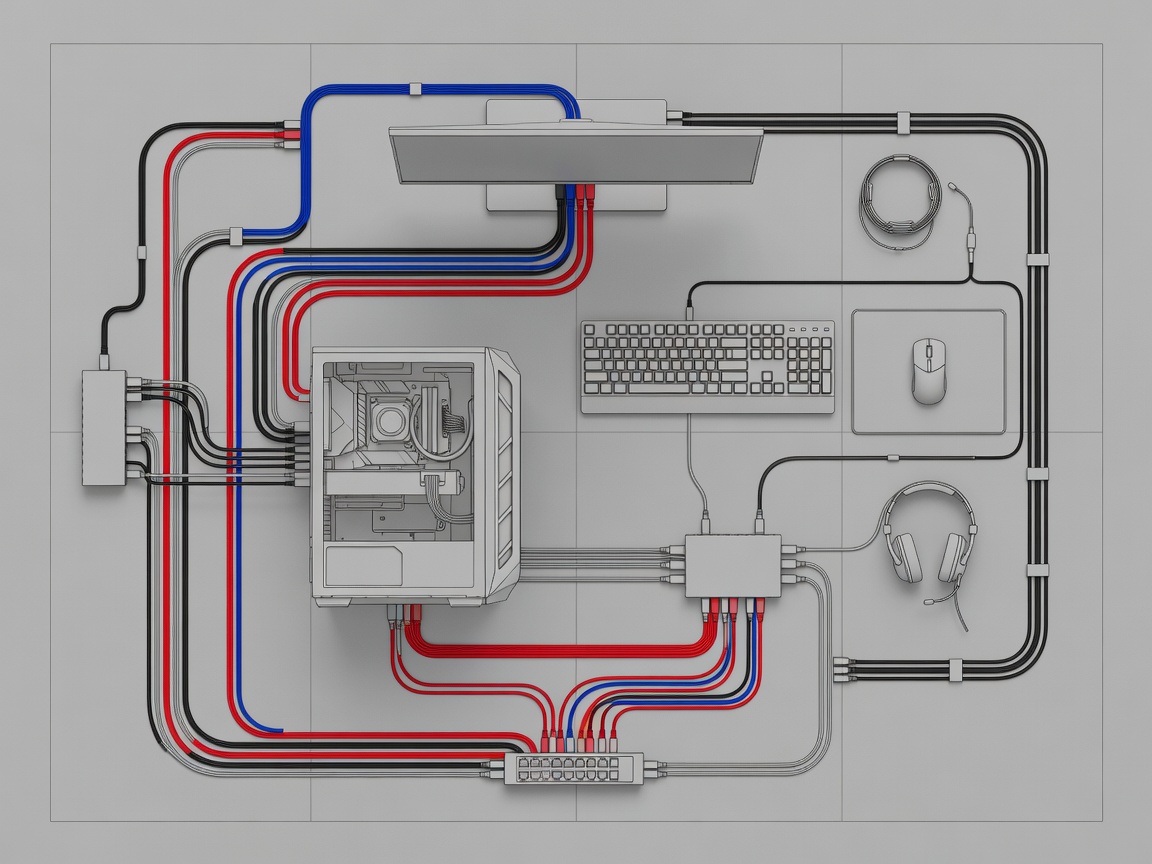
Start with the game environment
Document the game, platform, tournament rules and permitted settings before selecting machines. Counter-Strike 2, VALORANT, League of Legends and Rocket League do not create identical deployment requirements. Check current publisher requirements, event licensing conditions and anti-cheat behaviour rather than assuming that a previous event image remains suitable.
For a PC event, identify the Windows 11 edition and supported configuration, graphics driver policy, launcher access and administrator permissions. Riot Vanguard can introduce operating-system and restart dependencies; verify the current requirements with Riot Games. For PlayStation 5 or Xbox Series X events, confirm controller connections, game entitlements, profile management and any local multiplayer restrictions. The platform decision belongs in the brief, not in a last-minute setup conversation.
Map the physical connection chain
Describe the display model, supported input, required resolution and intended refresh mode. DisplayPort and HDMI are connection families, not guarantees that every combination of source, cable and display will deliver the same timing. Record the cable type, length and actual tested mode. Include the stand, mounting arrangement and any approved VESA mounting hardware in the rental scope.
Peripheral planning needs equal precision. USB-A and USB-C describe connector shapes, while USB capabilities depend on the actual device and port implementation. A keyboard, mouse, controller and headset can exhaust convenient ports quickly. Test any hub with the complete reference station; do not add an untested hub during a live match simply because its connector fits.
Make venue dependencies visible
A wired Ethernet connection requires more than a patch lead at the desk. Identify who supplies switching, patching, address allocation and the route to the game service. IEEE 802.3 provides the Ethernet standards framework; it does not establish that your venue network is correctly configured. Confirm firewall rules, authentication requirements and any isolation between player, production and public traffic with the venue network lead.
Power planning belongs with a qualified venue representative. List equipment power requirements and the distribution arrangement without assuming that nearby sockets are on separate circuits. Agree who provides compliant distribution, cable protection and access to isolation points. Keep power and network drawings consistent with the furniture plan, including safe routes around walkways and accessible player positions.
Reference station acceptance checklist
- Identify the station role, asset labels and delivered hardware configuration.
- Check display resolution and refresh rate in both the operating system and monitor controls.
- Confirm all peripherals, audio channels and permitted player settings.
- Join the intended game environment using the planned network path.
- Restart from a powered-down state and repeat the essential checks.
- Record the known-good cables, driver state and recovery method.
Perform acceptance with the event configuration, not a supplier demonstration account that will disappear before play. A successful desktop login does not prove game-server access, microphone routing or anti-cheat readiness. Ask an administrator to observe a complete join, practice and restart cycle, then record the result against the station identifier.
Plan replacement without improvisation
Spare planning should follow failure impact and recovery time, not an arbitrary percentage. A spare mouse is only useful if its settings can be restored and an official can approve the change. A spare computer needs the correct image, accessible credentials and a known network location. Define who can authorise each swap and where the replacement will be staged.
Finish by assigning every dependency to an owner: rental provider, organiser, venue, network contractor or player. If ownership is blank, the dependency is unresolved. Use the resulting station record as the input to your specification comparison and carry its identifiers into the handover record.